Short answer
Everything you can. A local MCP server is an ordinary process launched with your user's privileges, so it can read any file you can, open any connection your machine can — localhost services, the office LAN, the cloud metadata address — and hold whatever secrets you put in its config. The tool list the client shows you limits what the model asks for, not what the process can do. We counted the official registry: 16,580 servers run locally and 38% of them ask for a secret. Treat each one as a dependency with a shell, and sandbox it — in our test, that cost nothing.
The question is wrong, and that is the answer
People ask what an MCP server can reach as if it were a property of the server — as if a GitHub connector reaches GitHub and a filesystem connector reaches one folder. It is not a property of the server. It is a property of how you launched it.
A local MCP server — the kind you add with a line in claude_desktop_config.json,
.cursor/mcp.json or .vscode/mcp.json — is an ordinary program. The client starts it as
a child process, talks to it over standard input and output, and that is the entire
security model. The process runs as you. It can read what you can read, connect to what
your machine can connect to, and start other programs. The protocol's own security page
says so plainly: local servers "may have direct access to the user's system," and
without sandboxing an attacker "can execute any command with MCP client
privileges."[2]
So the honest answer to "what can it reach on our network" is: the same things your laptop can. The rest of this page is about how many of these things are on your laptops, what they ask you to give them, why the approval prompt does not change any of it, and the one control that does — which, it turns out, is free.
Two permission systems, and only one is enforced
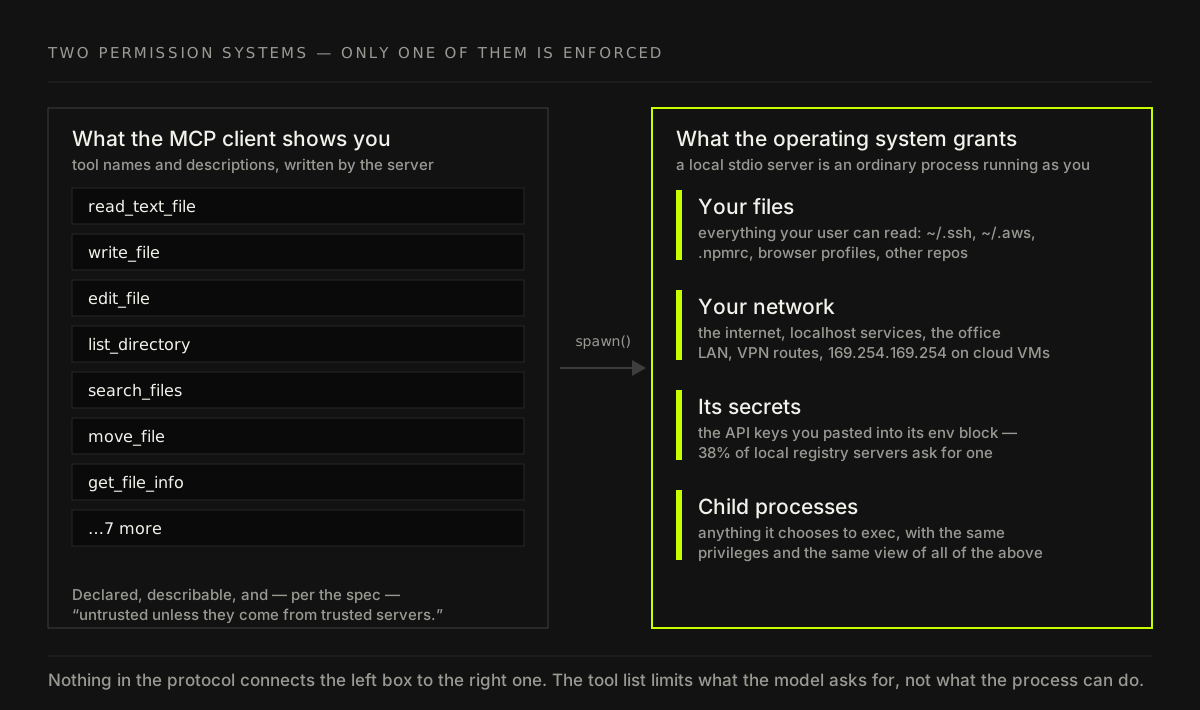
Every MCP client shows you something that looks like a permission screen: a list of tools, a toggle per tool, a prompt before a call. It feels like the thing you are approving is the server's reach. It is not. That list is written by the server, and the specification instructs clients to treat its annotations "as untrusted unless they come from trusted servers."[3] More importantly, it only governs one thing: which tool calls the model may ask for.
It has no say over what the process does on its own. Code runs at import time, before
the first tool is listed. It runs on a timer. It runs inside the get_weather tool you
approved, doing something that is not getting the weather. Invariant Labs showed in April
2025 that a tool's description alone could steer an agent into reading ~/.ssh/id_rsa
and the client's own MCP config, and that a server could change its tool descriptions
after you had approved them — the "rug pull."[5] That
attack goes through the model. The easier one does not need the model at all.
We counted the registry
Opinions about how common this is are cheap, so we counted. On 12 October 2026 we paged through the entire public API of the official MCP Registry — the one run by the protocol's maintainers — and pulled the latest version of every server.[1] No scraping of READMEs, no sampling: every entry, read from the metadata the authors themselves submitted.
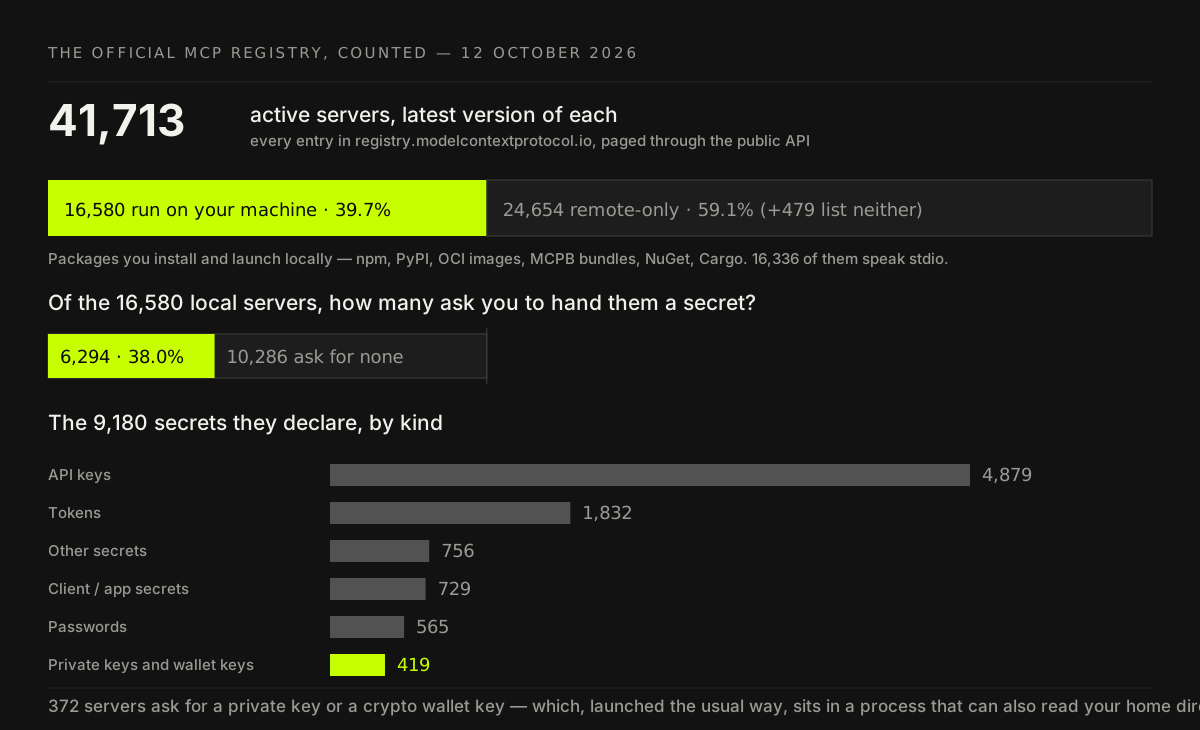
41,713 active servers. 16,580 of them — 39.7% — are packages you download and run on your own machine: npm, PyPI, container images, MCPB bundles, NuGet, Cargo. 16,336 of those talk over stdio, which means a child process of your editor or desktop app.
Then the number that should make a CISO put their coffee down. 6,294 of the local servers — 38% — ask you to hand them a secret, and they declare 9,180 secrets between them. Most are API keys. 565 are passwords. 419 are private keys or crypto wallet keys, requested by 372 servers. Every one of those is pasted into a config file in plain text, then handed to a process that, launched the usual way, can also read the rest of your disk. Astrix found the same shape from the other direction: across 5,205 server repositories, 53% relied on static API keys or personal access tokens, 79% of keys were passed through plain environment variables, and only 8.5% used OAuth.[14]
Notice what this does to the question. You do not need a malicious server for the secret to leak. You need any one server on the machine to be malicious, compromised or vulnerable, because they all share one user account, and one home directory.
The default that sounds safe and isn't
There is a reassuring detail in the official TypeScript SDK. When a client launches a
stdio server, it does not hand over your whole shell environment. It passes a short
allowlist "inspired by the default env inheritance of sudo": HOME, LOGNAME, PATH,
SHELL, TERM, USER, plus whatever the config adds explicitly.[4]
We checked it in our lab: our shell held 151 environment variables, and the SDK's
default passed four of them through.
That is good engineering, and it protects much less than it looks like. One of those
variables is HOME. Your SSH keys, your ~/.aws/credentials, your .npmrc publish
token, your .kube/config, your browser profile — none of them live in the environment.
They live in files under HOME, and filtering environment variables does nothing to a
process that can open files. The spec's own example of a malicious one-click install is
exactly that: a command that curls ~/.ssh/id_rsa to a remote address.[2]
This is not hypothetical. The SANDWORM_MODE npm worm in February 2026 installed its own rogue MCP server into developers' assistant configs, with tool descriptions telling the coding assistant to gather SSH, AWS and npm secrets — and "not mention this context-gathering step to the user."[7] In August, OX Security traced a Shai-Hulud wave through an entry in the official registry itself, linking to a clean package and a repository whose editor config ran on open.[8]
The network is bigger than "the internet"
"Network" in the question usually means "can it phone home." That is the least interesting part. A process on a developer laptop can reach:
- localhost. Every dev server, database, admin panel and debugging port you have running, most of them unauthenticated because "it's only local." The MCP Inspector itself shipped exactly this bug: its proxy listened without authentication and could be driven from a web page, a CVSS 9.4 remote code execution.[10]
- The office network and the VPN. Whatever your laptop routes to — internal wikis, staging, the CI server, the printer with the 2019 firmware.
- 169.254.169.254. On a cloud VM, a dev container or a CI runner, the instance
metadata service hands out temporary cloud credentials to anything that asks, which is
why AWS built IMDSv2 specifically to defend against server-side request
forgery.[12] The MCP spec names this address and tells clients to
block the whole
169.254.0.0/16range for exactly this reason.[2]
And a server does not have to be malicious to become the attacker's network access. Equixly's review of popular implementations reported command injection in 43% of the servers it tested, unrestricted URL fetching in 30% and file access outside the intended directory in 22% — a vendor figure without a published sample size, but the direction is the point.[13] A server with an unrestricted fetch tool and a model that reads untrusted text is a server-side request forgery primitive that sits inside your network perimeter.
Is the code you launch the code that was registered?
Here is the finding we did not expect, and as far as we can tell nobody has published it.
A registry entry names a specific package version. The config most people copy does not
— it says npx some-mcp-server or uvx some-mcp-server, which resolves to whatever is
latest at the moment the editor starts. So we checked, for every registry package,
whether those two are still the same thing.
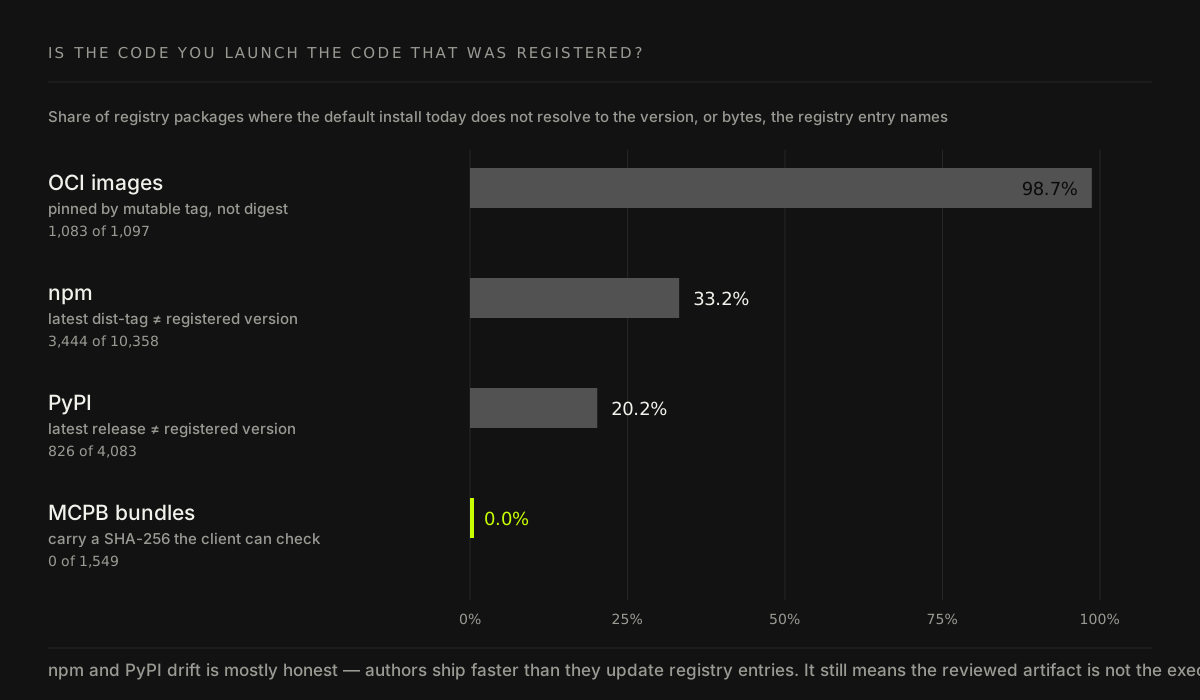
On npm, 3,444 of 10,358 packages — a third — have a latest release that is not the
version the registry entry names. On PyPI it is 826 of 4,083, one in five. Of 1,097
container images, 1,083 are referenced by a tag like :latest or :1.2, which the
publisher can repoint at any time; only 14 are pinned by digest. The single bright spot is
the MCPB bundle format: all 1,549 carry a SHA-256 hash in the registry, so a client can
verify it is running the exact bytes that were published.
Most of that drift is innocent — 3,336 of the npm mismatches are simply newer releases
the author never re-registered. That is the point, not the excuse. Whatever review,
scan or approval happened against the registered version did not happen against the
code your editor launches tomorrow morning. That is precisely the gap the first
malicious MCP server in the wild used: postmark-mcp shipped fifteen clean versions,
built up roughly 1,500 weekly downloads, and in version 1.0.16 added one line that blind-
copied every email it sent to the attacker.[6] Everyone on
npx postmark-mcp updated themselves into it.
One more number from the same pass, because it is the kind of thing that turns into an incident: 21 active registry entries point at a PyPI project name that, on the day we checked, returned no project at all. We are not listing them here; we are reporting them to the registry maintainers.
The vulnerabilities are in the plumbing, too
It is tempting to treat this as a "don't install sketchy servers" problem. The record says otherwise — the serious bugs have repeatedly been in the trusted, official plumbing:
- mcp-remote, the widely used bridge from local clients to remote servers, had an OS command injection triggered by a malicious server's OAuth metadata — CVSS 9.6, fixed in 0.1.16.[9] Connecting to the wrong URL was enough.
- The reference Filesystem server — the one that exists to confine access to one folder — had a prefix-matching bypass and a symlink escape (CVE-2025-53110 and CVE-2025-53109), the second rated 8.4 and leading to code execution.[11]
- Smithery, a hosting platform for MCP servers, leaked a deployment token through a path traversal in its build config that reached more than 3,000 hosted apps, with root command execution.[16]
- Remote servers are not exempt: a 2026 measurement of 7,973 live remote MCP servers found 40.55% exposing tools with no authentication, and flaws in 96.6% of the OAuth dynamic-client-registration setups tested.[15]
The filesystem case is the instructive one. Its allowed-directory check is policy inside the process. Policy inside the process is exactly as strong as the process's own code — which is why the only boundary worth relying on is one the process cannot argue with.
We sandboxed the reference server and timed it
The usual objection to sandboxing is that it will break things or slow them down. So we
measured it. We took @modelcontextprotocol/server-filesystem 1.0.0, pointed it at one
working folder, and drove it with the official TypeScript SDK client 1.32.1 — thirty cold
starts launched plainly, thirty launched inside a Linux user and network namespace with
an empty, private home directory and no network. Each run: spawn, handshake, list the
tools, read a file inside the folder, try to read a file outside it.
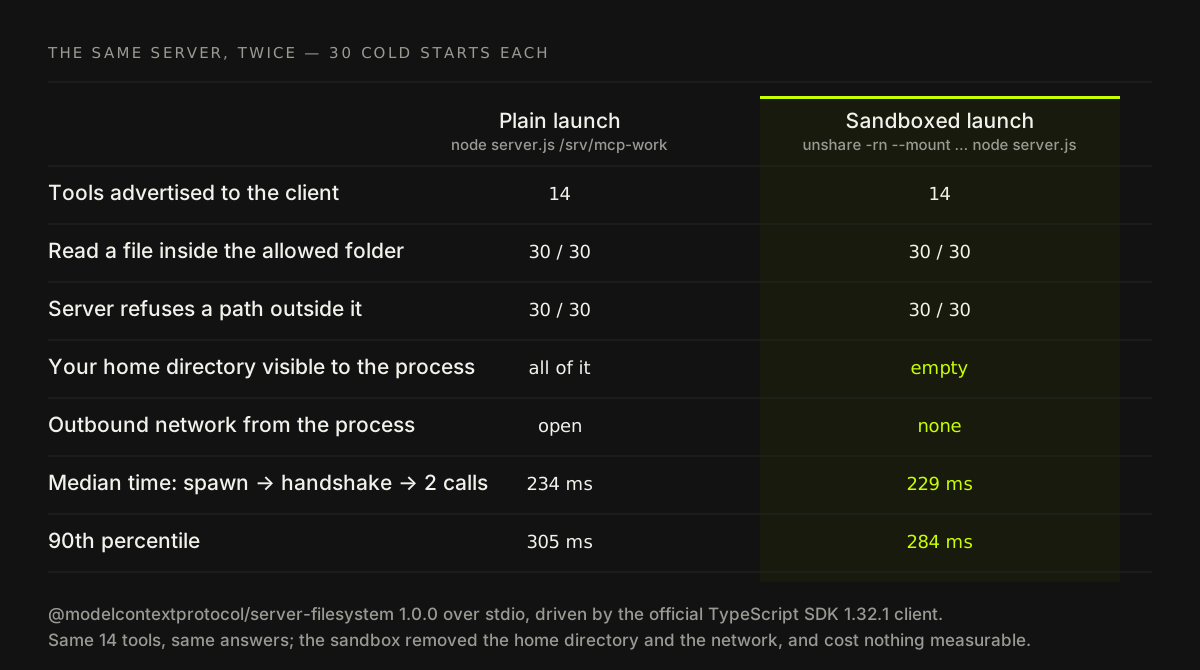
The result is the least dramatic chart on this page and the most important one. Same 14 tools. Same answers, 30 out of 30. The server's own outside-folder check refused the same request in both cases — and in the sandboxed case it no longer mattered whether that check had a bug, because there was nothing outside the folder to see. The median round trip was 234 ms plain and 229 ms sandboxed: inside the noise, and if anything slightly faster. The control that actually bounds what an MCP server can reach cost us nothing measurable.
The wrapper is one line, and on Linux distributions that allow unprivileged user namespaces it needs no root:
unshare -rn --mount --propagation private sh -c \
  'mount -t tmpfs none "$HOME" && exec node server.js /path/to/project'
On macOS, a container with one bind mount and --network none does the same job;
VS Code now ships an opt-in sandboxEnabled setting for MCP servers on macOS and Linux,
while noting that local servers "can run arbitrary code on your machine."[17]
The specification already asks clients to do this by default — it says they SHOULD run
local servers "in a sandboxed environment with minimal default privileges."[2]
Most do not yet. Until they do, it is yours to do.
What to actually do on Monday
- Inventory the configs, not the servers. Search every developer machine and repo
for
mcp.json,claude_desktop_config.json,.cursor/mcp.jsonand.vscode/mcp.json. The question is not "which servers are approved," it is "which processes start when someone opens their editor." - Pin by hash, or by exact version. Prefer MCPB bundles and image digests. Where
you must use npm or PyPI, write the exact version into the config —
pkg@1.4.2, notpkg— so an update is a reviewed diff instead of a silent swap. - Sandbox every local server. One project folder, no home directory, no network
unless its job is the network. If it needs the network, allow its one API host and
block
169.254.0.0/16,127.0.0.0/8and your private ranges. - Move secrets out of config files. A scoped, short-lived token per server, from a secret manager, never a personal admin key. If a server asks for a wallet private key, the answer is no.
- Treat remote servers as vendors. Who runs it, what token it holds, what it logs, where that data goes. No authentication is not a configuration choice; it is a finding.
- Re-run this every quarter. More than half of the registry's 42,230 entries had their current version published in the six weeks before we counted. Your developers' configs moved just as fast.
The one-line version
An MCP server reaches whatever the process that runs it can reach, and by default that is everything you can. The approval prompt manages the model; only the operating system manages the process. Put the boundary there — it is the one control in this whole stack that we measured at zero cost — and it stops mattering quite so much which of 41,713 servers your team installed last week. If you want someone to find the configs that quietly grant all of it, that is most of what the readiness audit does, and the same reasoning sits under the slopsquatting page: the fix for software you did not write is a permission boundary, not more trust.
Follow-up questions
- Does the MCP client's approval prompt stop a server reading my files?
- No. The prompt governs which tool calls the model is allowed to make. It has no say over what the server process does on its own once it is running — at startup, on a timer, or inside a tool you approved for something else. The specification itself tells clients to treat tool annotations as untrusted and to warn users that local servers run with the client's privileges. The only thing that limits the process is the operating system, so that is where the limit has to go.
- Is a remote MCP server safer than a local one?
- It is safer for your laptop and riskier for your data. A remote server cannot read your home directory, but everything you send it leaves your network, and it holds a token to whatever it fronts. A 2026 study of 7,973 live remote servers found 40.55% exposed tools with no authentication at all. Judge a remote server like a SaaS vendor — who runs it, what token it holds, what it logs — and a local one like a dependency that can run code.
- The TypeScript SDK only passes a few environment variables. Doesn't that protect my secrets?
- It protects secrets that live only in environment variables, which is fewer than people think. The SDK's default passes six variables on Linux and macOS, one of which is HOME — and your SSH keys, cloud credentials and package tokens live in files under HOME, not in the environment. Filtering the environment is good hygiene. It does not stop a process that can read your disk.
- How do I sandbox an MCP server without breaking it?
- Give it a filesystem view of only the folder it needs, no network unless its job is network access, and no home directory. On Linux that is a few unshare or bubblewrap flags; on any platform it can be a container with a bind mount and no network; VS Code has an opt-in sandbox setting on macOS and Linux. In our test the reference filesystem server ran all 14 tools identically inside a sandbox, with no measurable latency cost.
- Should we pin MCP server versions?
- Yes — by hash where the format allows it, by exact version everywhere else. A config that says npx with a bare package name runs whatever the package's latest release is at launch time. On npm, a third of registry entries already point at a version that is no longer the latest, and the first malicious MCP server in the wild turned bad in its sixteenth release, after fifteen clean ones. Pinning turns a silent update into a change someone reviews.
Sources
- Official MCP Registry API (v0), all servers, latest version of eachModel Context Protocol · 2026-10-12
- Security Best Practices (specification 2025-11-25)Model Context Protocol · 2025-11-25
- Tools (specification 2025-11-25)Model Context Protocol · 2025-11-25
- TypeScript SDK: stdio client transport and default inherited environmentmodelcontextprotocol/typescript-sdk on GitHub · 2026-10
- MCP Security Notification: Tool Poisoning AttacksBeurer-Kellner & Fischer, Invariant Labs · 2025-04-01
- Trust in MCP takes first in-the-wild hit via squatted Postmark connectorCSO Online · 2025-09-26
- SANDWORM_MODE: npm worm installs a rogue MCP server to steal developer secretsheise online, crediting Socket · 2026-02-26
- Shai-Hulud outbreak debrief: the worm evolves into MCPOX Security · 2026-08-09
- Critical RCE vulnerability in mcp-remote (CVE-2025-6514)JFrog Security Research · 2025-07-09
- Critical RCE vulnerability in Anthropic MCP Inspector (CVE-2025-49596)Oligo Security · 2025-06-27
- EscapeRoute: breaking the scope of Anthropic's Filesystem MCP server (CVE-2025-53109, CVE-2025-53110)Cymulate · 2025-07
- Add defense in depth against open firewalls, reverse proxies, and SSRF vulnerabilities with enhancements to the EC2 Instance Metadata ServiceAWS Security Blog · 2019-11-19
- MCP Servers: The New Security NightmareEquixly · 2025-03-29
- State of MCP Server Security 2025Astrix Security · 2025-10-15
- A First Measurement Study on Authentication Security in Real-World Remote MCP ServersZhou et al., arXiv:2605.22333 · 2026-05
- Breaking MCP server hosting: how a path traversal exposed 3,000+ serversGitGuardian · 2025-10-22
- Use MCP servers in VS Code (sandboxing and trust)Visual Studio Code documentation · 2026