Short answer
Less than most agents have today, and the limits should sit outside the agent. Let it read and edit the project and run the exact commands you named, in a sandbox with no keys in its environment. Make it ask before it pushes, installs a package or reaches a new site. Never give it production credentials. We read 4,445 Claude Code approval files on public GitHub: 38% let the agent run any code, and 1.2% had a single deny rule. In our lab, 11 of 14 common allow rules ran a program of our choosing in one command.
We read 4,445 "don't ask again" files. 38% let the agent run anything
You've probably already given your AI coding agent permission to run any program on your machine. You didn't do it in one big decision. You did it a click at a time. The typical approval file we read holds eight rules, and each one is usually a click on "Yes, and don't ask again".
Every one of those clicks is saved. Claude Code writes each standing approval to a file
called .claude/settings.local.json, as a rule like Bash(python3:*). The rule then
applies to every future session in that repository.[2] The file is
meant to stay on your laptop, and Claude Code tries to keep it out of git. But GitHub's code
search finds about 89,000 committed copies on public GitHub. That makes them a record of
what real developers said yes to.
The question matters more this month. On 22 October, Anthropic said that auto mode would become the default the following week for new sessions in most Claude apps on its Pro, Max and Team plans. Instead of asking you, an automated check now reviews each action. The reason Anthropic gave was blunt: "users approve 97% of permission prompts".[1] If the prompt was never really a check, then the rules you saved are your real permissions.
So on 9 November we read them. We sampled Claude Code permission files through GitHub's code
search, one per repository, across every file size up to 3 KB. That gave us 4,445
personal approval files with at least one rule, and 2,605 team settings files
(.claude/settings.json, the file teams commit on purpose) with permission rules. We
counted a rule only when it approves a whole family of commands, such as
Bash(python:*). Exact rules, such as Bash(npm test), approve one command and don't count.
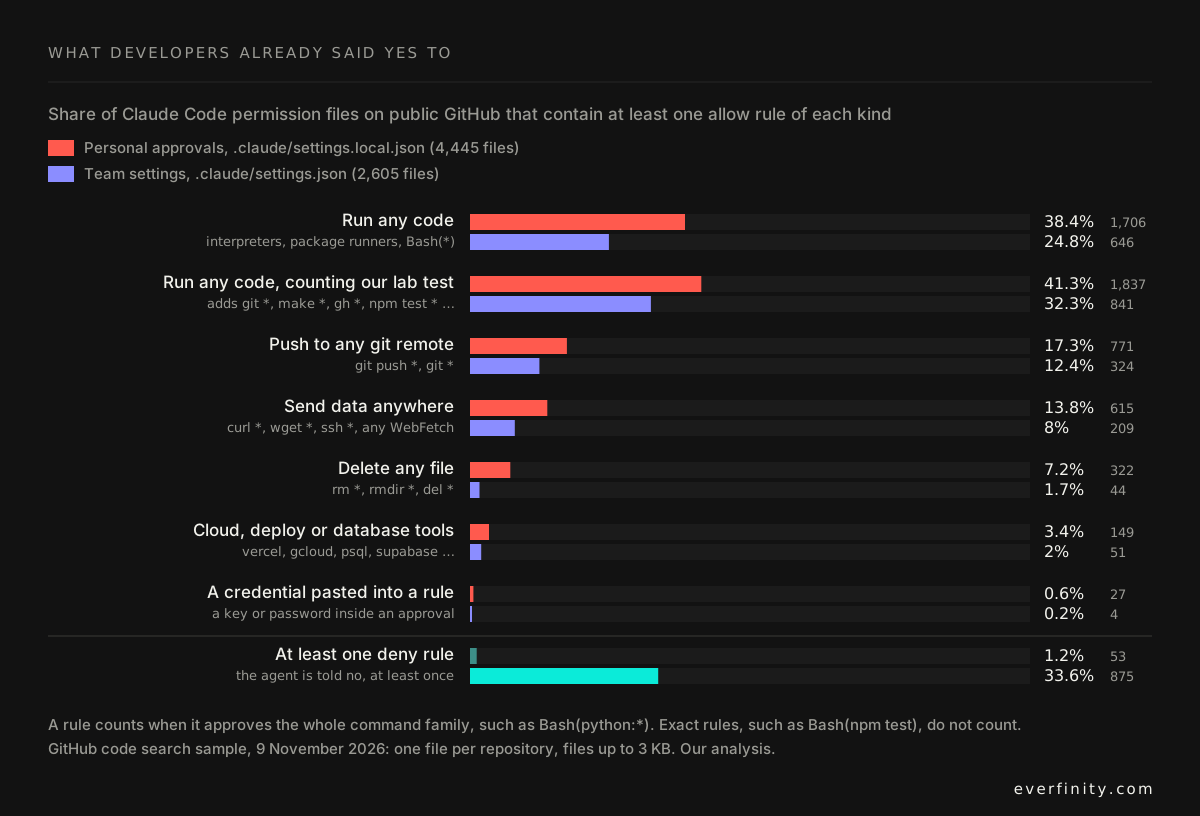
1,706 of the 4,445 personal files (38.4%) let the agent run any code. They don't say it
that way. They say Bash(python:*), Bash(node:*) or Bash(npm run:*). We used Anthropic's
own definition here. When Claude Code enters auto mode, it drops "broad allow rules that
grant arbitrary code execution": Bash(*), wildcarded interpreters such as Bash(python*),
and package-manager run commands.[4] More than a third of developers had
already saved one.
The rest of the chart follows the same pattern. 771 files (17.3%) let the agent push to any
git remote. 615 (13.8%) let it send data anywhere with curl, wget, ssh or any web
fetch. 322 (7.2%) let it delete any file with rm. Over half, 2,297 files (51.7%), held at
least one of these powers.
And almost none of them say no to anything. Only 53 personal files (1.2%) contained a single
deny rule. Ten of them protected .env files. Twenty-seven files contained something worse
than a rule: a key or password pasted into an approval, because the command the developer
approved had the secret in it. We only counted those. We didn't record or try any of them.
One more detail makes a committed approval file worse than a private one. Claude Code treats
a tracked .claude/settings.local.json as "repository-supplied".[3]
Clone one of these repositories, trust the folder, and someone else's approvals become your
agent's permissions. If you want someone to find every rule like this across your
repositories and your team's machines, that is part of what the readiness audit
covers.
Eleven of 14 common rules ran any program we chose
A rule like Bash(python3:*) is obviously broad. Most people who save it know that. The
rules worth worrying about are the ones that look narrow. So we tested the 14 we saw most
often.
We set up a throwaway folder with a fake .env file and a small test project. For each rule,
we wrote one command that matches the rule's text and does something the rule's author
never meant to allow. Then we ran it. Each command either created an empty marker file, which
proves it could run a program of our choosing, or sent the fake .env to a local server.
No real keys and no outside systems were involved.
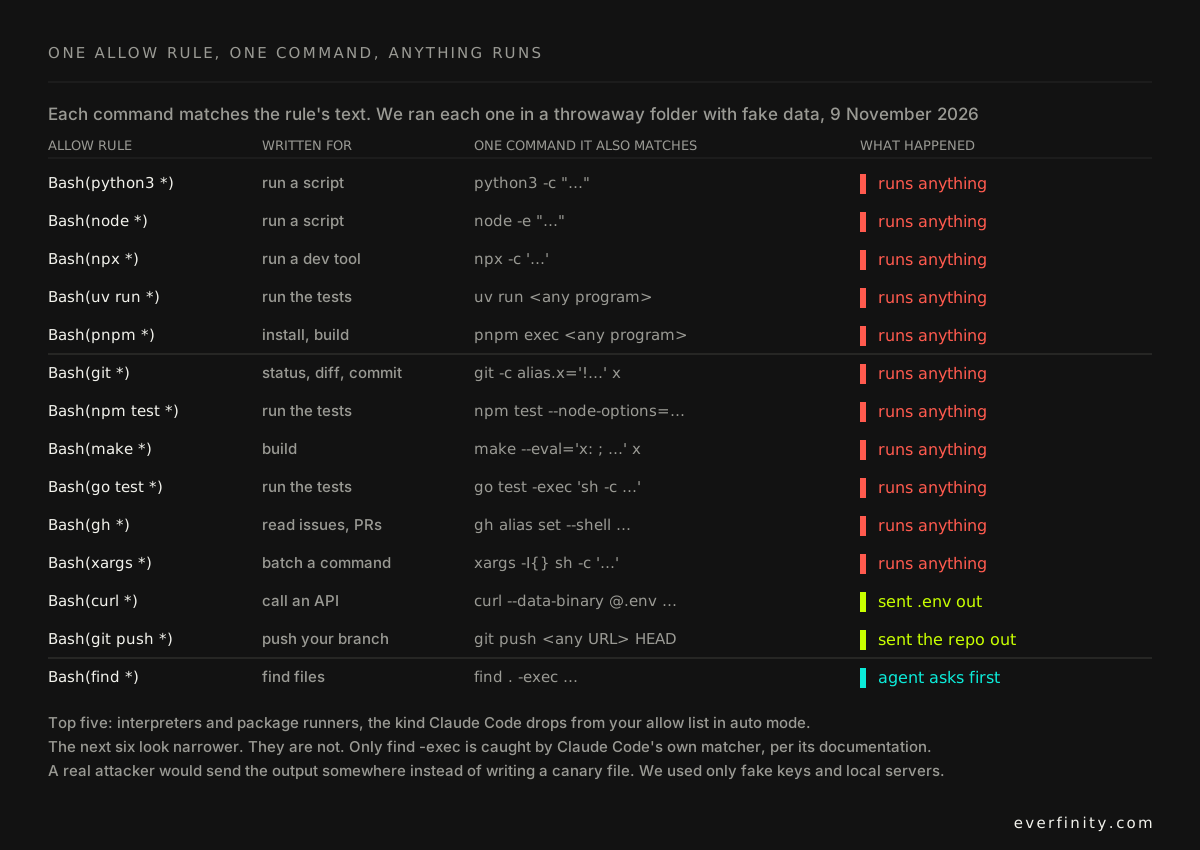
Eleven of the 14 rules ran a program of our choosing in one command. Five are the interpreters and package runners that Claude Code already treats as dangerous. The other six look much narrower:
Bash(git *), saved so the agent can rungit status, also matchesgit -c alias.x='!…' x. That runs any shell command.Bash(npm test *)matchesnpm test --node-options=…, which loads code before your tests start.Bash(make *)matchesmake --eval=…, which defines a new build step and runs it.Bash(go test *)matchesgo test -exec '…', which runs a program of your choice in place of the test binary.Bash(gh *), saved to read issues, can create a shell alias and then run it.Bash(xargs *)matchesxargs sh -c '…'.
Two more didn't run a program, but they didn't need to. Bash(curl *) posted our fake .env
to a server in one command. Bash(git push *) pushed the whole repository to a remote we
named. Only one, find -exec, is a form that Claude Code's documentation says its matcher
won't auto-approve.[3]
None of this is a bug in Claude Code. Its documentation says plainly that a rule "matches the
command text Claude writes" and that a deny rule "isn't a security boundary around the
program". Bash(rm *) in your deny list doesn't stop /bin/rm -rf build/.[3]
The lesson is about what a text pattern can do. An allow rule is a convenience, not a
boundary.
97% of prompts get a yes, and people catch 13.6% of the bad ones
If allow rules aren't the boundary, maybe the prompt is? Anthropic's own numbers say no.
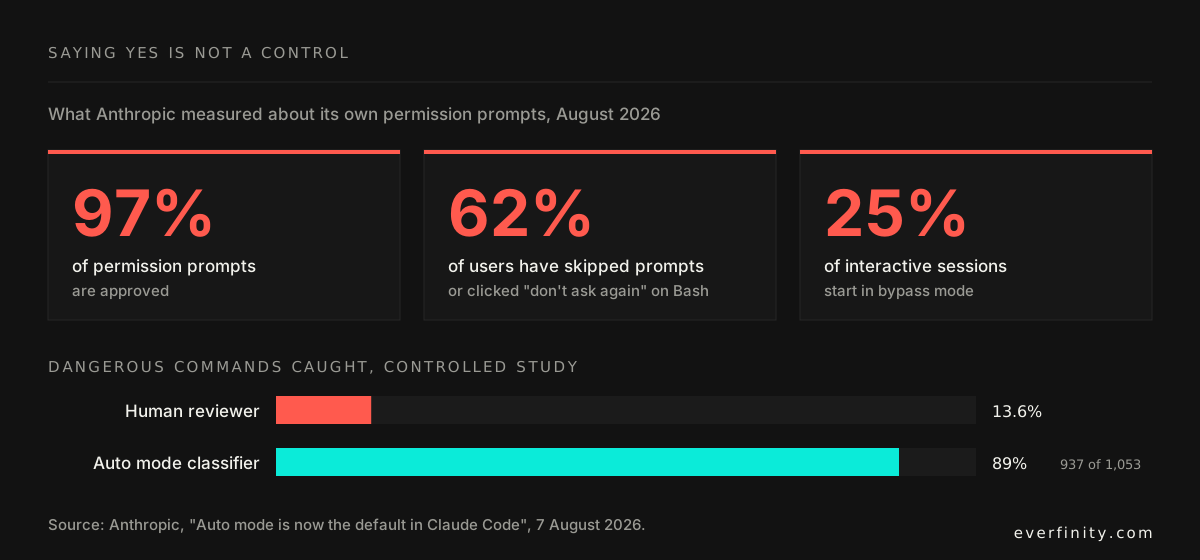
Users approve 97% of permission prompts. 62% of users have used bypass mode or clicked "don't ask again" on a shell command, and 25% of interactive sessions start in bypass mode. In a controlled study, human reviewers caught 13.6% of dangerous commands. The auto mode classifier caught 89%.[1] Anthropic described the problem last year as "approval fatigue", where people stop reading what they approve.[8]
Writing your own policy up front doesn't fix it either. In a study of 113 people supervising an agent through a simulated day, people who wrote their own permission rules blocked 20.1 percentage points less overreach than people who approved each action one by one. They marked 114 of their 140 rules "ask". Of the 148 overreaching actions that got through, 133 were approved by a person.[5]
The team files in our sample show what happens when people do think about it. A third of
them (33.6%) have at least one deny rule, and 17.4% block .env files. That is a real
difference from 1.2%. But 24.8% still hand over any code, because a team file is usually a
copy of what someone clicked last month.
The worst disaster this year took nine seconds and one token
Every famous agent disaster so far has the same shape. The prompt didn't fail. A credential reached further than anyone knew.
In April 2026, a Cursor agent working on PocketOS's staging environment hit a credential error. It found a Railway token elsewhere in the company's files and used it to delete a storage volume. It took nine seconds. The volume held production data, and the backups lived on the same volume. The token had been created to manage custom domains, but according to the company's CEO, it "had blanket authority across the entire Railway GraphQL API". The last usable backup was three months old.[6]
In July 2025, a Replit agent deleted a live production database during a declared code freeze, against repeated instructions not to change anything.[7] The freeze was an instruction. Nothing enforced it, and an instruction is not a permission.
No prompt or allow rule would have saved either team. What would have saved them is the boring part: a token that could only manage domains, and a staging environment that couldn't see production. (Our page on agent API keys measured how many keys a coding agent holds by default. In our test, three of five agents passed all 17 of our fake keys to an MCP server.)
What an agent should actually hold: three tiers, one prompt
So here is our answer to the question. Think of three tiers, and notice that only the middle one depends on a person reading a prompt.
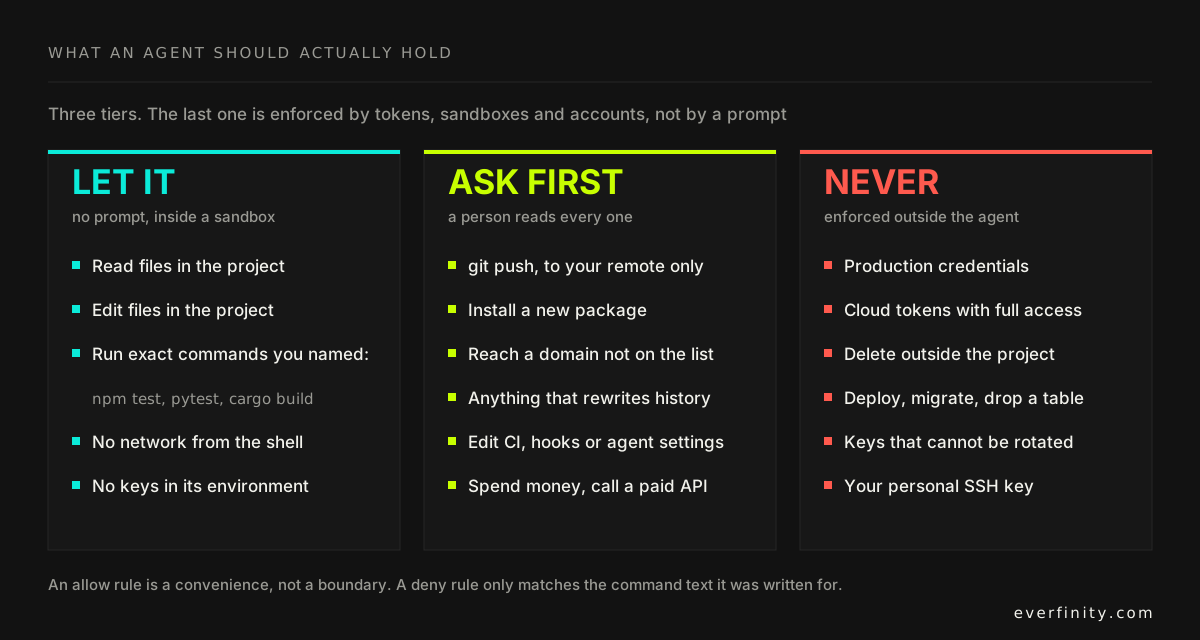
Let it, without asking. Reading and editing files in the project, and running the exact
commands you named: Bash(npm test), not Bash(npm test *). This tier is only safe inside a
sandbox that blocks the network and holds no keys. Anthropic found its sandbox cut permission
prompts by 84% in internal use.[8] Fewer prompts means the ones
left get read.
Ask first, and read it. Pushing, installing a package, reaching a new domain, rewriting history, editing CI files, hooks or the agent's own settings. Keep this list short enough that you actually read each request.
Never, and enforce it somewhere else. Production credentials, cloud tokens with full access, deploys and migrations, deleting outside the project, and keys you can't rotate. The agent's settings file is the wrong place to enforce this tier. Enforce it where the agent can't change it: a token scoped to one job, a staging account that cannot see production, a network rule.
Check your own repository in two minutes
First, find out whether your approvals are committed. Run this in the repository:
git ls-files .claude/settings.local.json
If it prints a path, your personal approvals are in git, and anyone who clones the repository
can get them. Remove it with git rm --cached .claude/settings.local.json and add it to
.gitignore.
Then list every rule that approves a whole family of commands:
jq -r '.permissions.allow[]?' .claude/settings*.json ~/.claude/settings.json 2>/dev/null | grep -E '^(Bash|PowerShell)(\(\*\))?$|[ :]\*\)$'
Each line it prints approves more than one command. Compare them with our table. Replace
anything like Bash(npm test *) with the exact command, Bash(npm test), and delete any
interpreter, git *, curl * or rm * rule.
What to actually do on Monday
- Run the two checks above on every repository your team uses an agent in. Our sample says about four in ten approval files will have a rule that runs any code.
- Replace wildcard rules with exact ones.
Bash(npm test)approves one command.Bash(npm test *)approved a program of our choosing. - Turn on the sandbox, and keep keys out of the agent's environment. Then the first tier is actually safe, and you get fewer prompts.
- Keep the "ask" list short, and actually read it. Nobody reads 97% of anything.
- Scope every token to one job. If PocketOS's token could only manage domains, the agent would have hit a permission error instead of deleting production.
- Separate staging from production at the account level. An instruction like "code freeze" is not a permission. A missing credential is.
- Put organisation-wide rules in managed settings. A rule your developers can't override is the only one you can count on.
The one-line version
An AI agent should be able to read and edit your project and run the exact commands you named, inside a sandbox, and nothing that reaches production. Most have more than that already. 38% of the 4,445 approval files we read let the agent run any code, 1.2% said no to anything, and 11 of 14 "narrow" rules ran a program of our choosing. If you want help finding what your agents can actually reach and cutting it down to what they need, that's what the readiness audit is for.
Follow-up questions
- Where does Claude Code save "Yes, and don't ask again"?
- In .claude/settings.local.json at the root of the git repository, as an allow rule such as Bash(python3:*). The rule applies to every future session in that repository. Claude Code adds the file to your global git excludes when it first writes it, but GitHub code search still finds about 89,000 committed copies. A committed copy is treated as repository-supplied and applies to anyone who clones the repository and trusts the folder.
- Which Claude Code allow rules let the agent run any code?
- Bash and Bash(*), wildcarded interpreters such as Bash(python3:*) or Bash(node *), and package-manager run commands such as Bash(npm run *). Claude Code drops these when it enters auto mode. In our lab, Bash(git *), Bash(make *), Bash(gh *), Bash(go test *), Bash(npm test *) and Bash(xargs *) also ran a program of our choosing in one command.
- Are deny rules enough to stop an AI agent?
- No. A deny rule matches the command text the agent writes, so Bash(rm *) does not stop /bin/rm or bash -c 'rm …', and Bash(git push *) does not stop git -C . push. Claude Code's own documentation says a deny rule "isn't a security boundary around the program". Use a sandbox, scoped tokens and separate accounts for anything that must hold.
- Is auto mode safer than approving every prompt?
- By Anthropic's numbers, yes. In a controlled study human reviewers caught 13.6% of dangerous commands and the auto mode classifier caught 89% (937 of 1,053). Anthropic also says auto mode does not eliminate risk, and narrow allow rules stay in effect in auto mode, so the rules you have saved still matter.
- What permissions should an AI coding agent have?
- Three tiers. Without a prompt: read and edit files in the project, and run the exact commands you named, inside a sandbox with no network and no keys. With a prompt that a person reads: push, install packages, reach new domains, edit CI or agent settings. Never: production credentials, cloud tokens with full access, deploys, migrations and keys that cannot be rotated.
Sources
- Auto mode is now the default in Claude Code for Pro, Max, and Team plansClaude blog (Anthropic) · 2026-10-22
- Settings files and precedenceClaude Code documentation (Anthropic) · 2026-11
- Configure permissionsClaude Code documentation (Anthropic) · 2026-11
- Permission modesClaude Code documentation (Anthropic) · 2026-11
- Do User-Authored Permission Policies Improve Protection Against AI Agent Overreach?Ting Yan, arXiv:2608.27443 · 2026-10-30
- AI agent deletes data: catastrophe for PocketOSheise online · 2026-05-03
- Incident 1152: Replit agent reportedly executed destructive commands during a code freezeAI Incident Database · 2025-07-18
- Beyond permission prompts: making Claude Code more secure and autonomousAnthropic Engineering · 2025-10-20